Start the local server
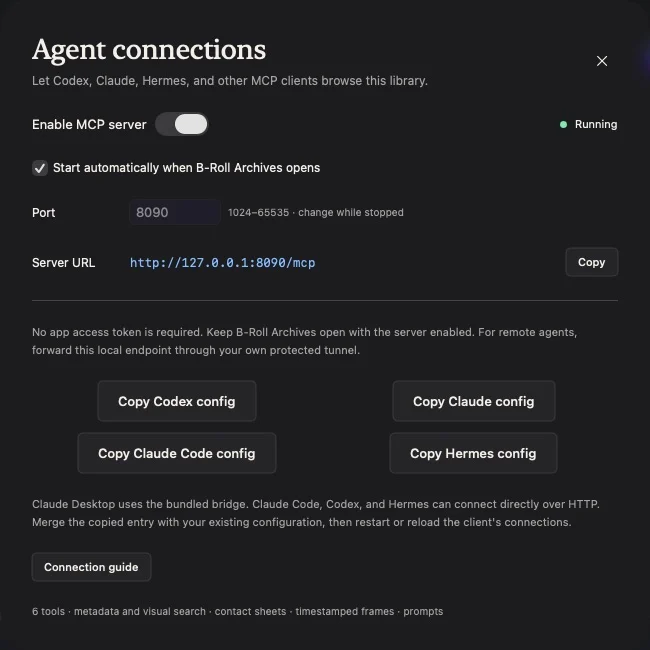
- Open Agent connections in the sidebar, or press ⌘,.
- Enable the MCP server and confirm Running.
- Use the displayed endpoint. The default is
http://127.0.0.1:8090/mcp. - Copy the configuration for Codex, Claude, or Hermes.
- Keep B-Roll Archives open while connected. Prepare visual search before asking about scenes or subjects.
No app access token is required. Change the port while the server is stopped if it conflicts with another local app, then copy an updated configuration.
Available read-only tools
| Tool | Purpose |
|---|---|
library_stats |
Sources, availability, counts, and visual-index coverage |
search_library |
Metadata/visual results, filters, and sampled match times |
get_clip_metadata |
Available media metadata and frame timestamps |
get_contact_sheet |
Cached overview image and sample times |
get_frame |
A cached sample or the nearest overview frame to a time |
get_video_at_timestamp |
A native app link to a clip at a valid timestamp |
Tools read the connected catalog and cached images. They do not modify source files or accept arbitrary filesystem paths. The server also provides resources and a find_footage prompt.
Range inspection and shotlists
Depending on the connected app version, your agent may also discover these tools:
| Tool | Purpose |
|---|---|
inspect_clip_range |
Prepare a denser contact sheet for a bounded source range |
get_library_job |
Retrieve the range job’s status, images, and actual timestamps |
create_shotlist |
Save an ordered sequence of valid clip ranges and shot notes |
Range inspection prepares local preview caches. Shotlist creation saves clip references, ranges, and notes in the native app. Neither changes source footage. Overlay notes describe an edit; they do not apply text to a video or render an export.
Browse the MCP prompts library for copy-ready retrieval and reel-planning requests. The reel prompt returns an edit plan when optional tools are unavailable.
Try a retrieval task
Ask your agent to find a described shot, inspect the returned frame, and give you its timestamp link. Confirm the image before accepting a visual match. Twelve overview samples can miss brief events, and similarity rank is not a confidence percentage.
Local and remote boundaries
The server listens on IPv4 loopback using Streamable HTTP. A client on another computer or in a cloud service needs your own protected tunnel. The app does not provide authentication for an exposed tunnel; apply your provider’s access controls before making one reachable.
An external agent may process retrieved text and images according to its provider settings. See privacy information.
If connection fails
Check Running status, the copied port, and the client’s configuration merge. A browser GET returning 405 is expected for this stateless POST transport. A proxy login page is a tunnel-provider issue; the app’s 403 can indicate an incompatible browser Origin. See the client guide and troubleshooting.