
What stays available
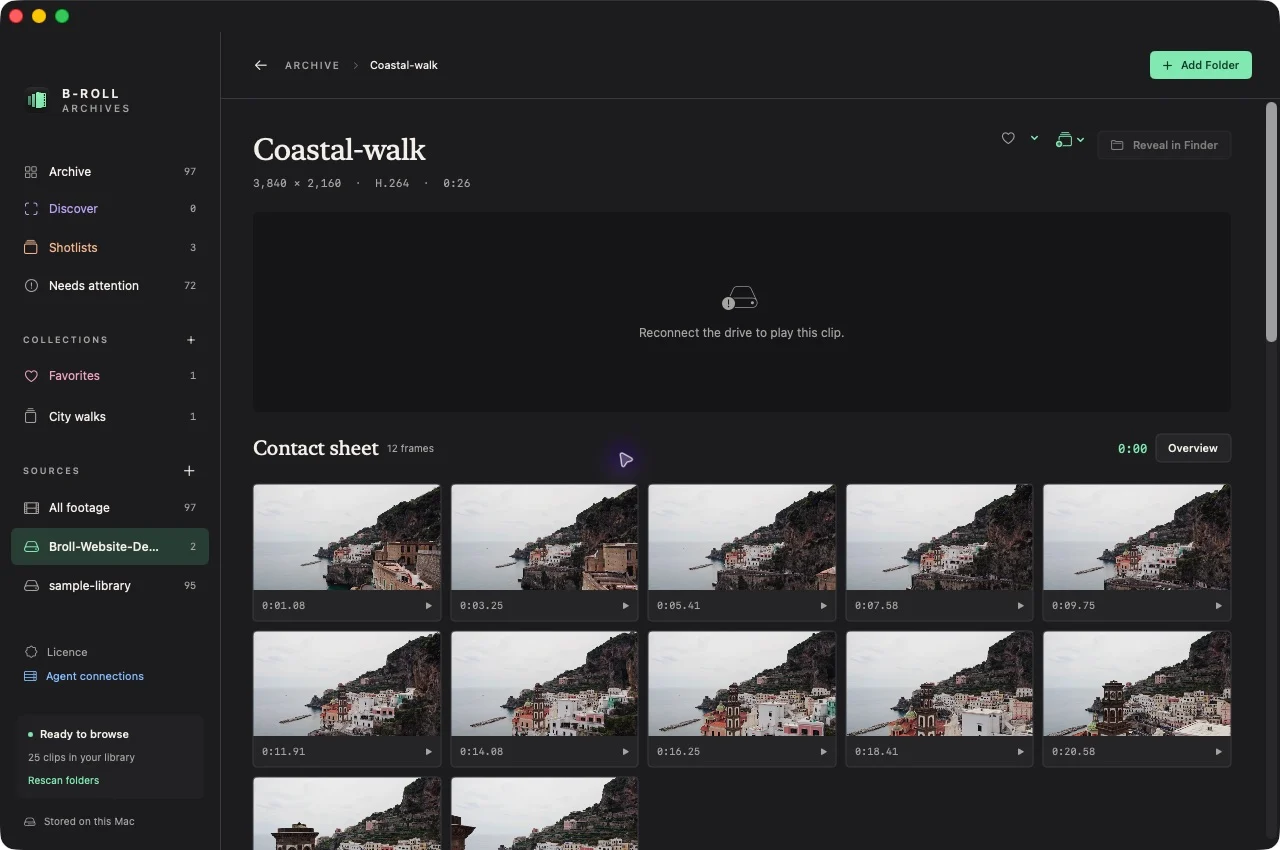
Prepared catalog data and previews live on your Mac separately from the source media. When a drive is disconnected, previously prepared contact sheets and metadata can still show what was filmed. Visual search can use valid locally cached indexed frames.
Original-file playback and revealing the source in Finder need the drive. A cached preview is not a backup of the original video.
Browse while disconnected
- Open the Archive and choose the prepared source.
- Inspect cached clip covers and contact sheets.
- Use recorded filenames, metadata, or prepared visual results to find a promising clip.
- Reconnect its source when you need playback or the original file.
Expected result: prepared footage remains recognizable while unavailable originals are clearly distinguished.
Reconnect or rescan a source
Mount the drive again. If the source moved, use the app’s source-reconnection flow to locate the intended folder. Rescan to check availability and discover changes. Avoid creating another source entry simply because a drive was temporarily unplugged.
What is stored locally
The app’s catalog, generated JPEG previews, visual index, and other prototype library data use its application-support storage. Source videos remain in their original folders. Range inspection retains only the latest denser frame set for each inspected clip.
Shared team catalogs and cloud sync are outside the first release. Back up original footage independently and allow disk space on the Mac for generated library data. If a source remains unavailable after reconnecting, see troubleshooting.