
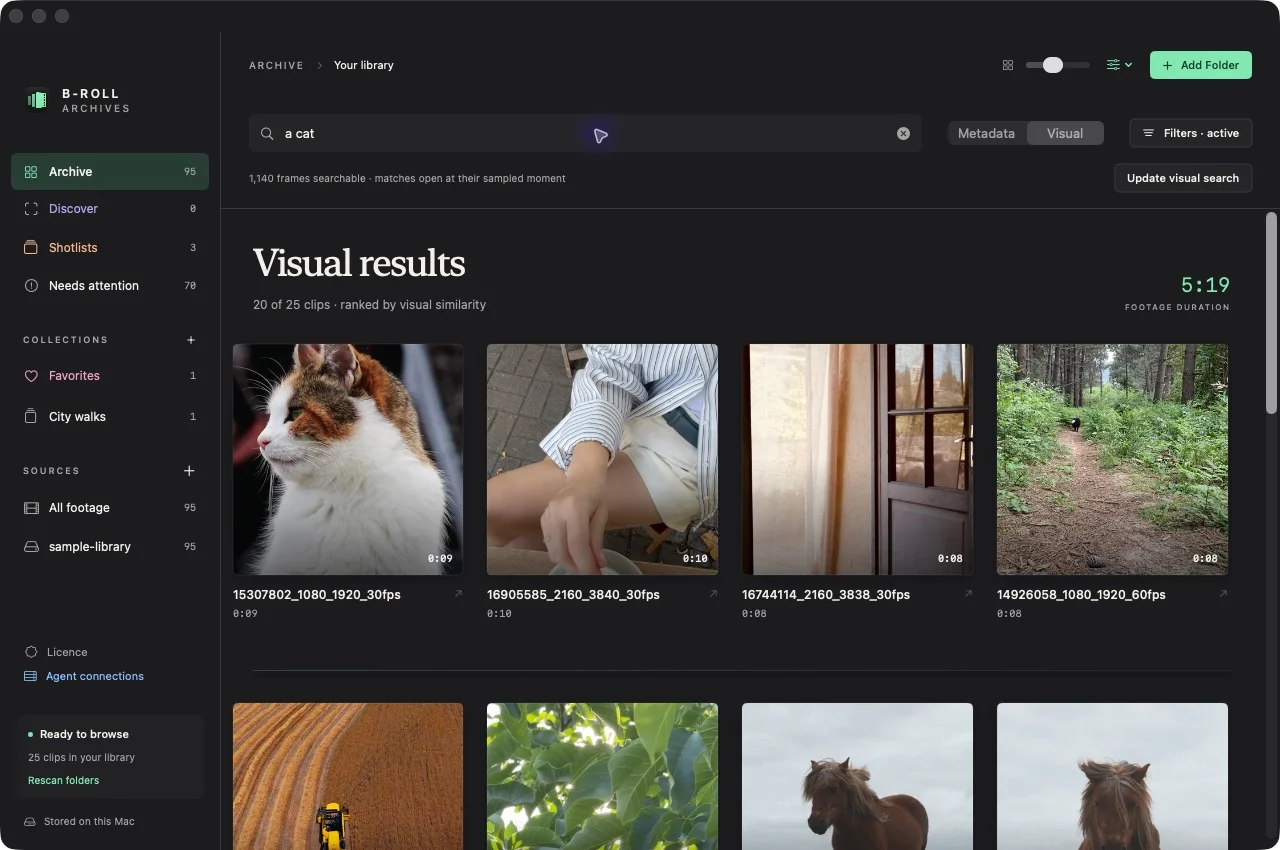
Prepare visual search
- Prepare contact-sheet previews for your source.
- Choose Visual in the Archive search toolbar.
- Choose Prepare visual search if the frame index has not been prepared.
- Let the app process cached overview frames locally. You can pause and resume this work.
If visual search was previously prepared, new or changed clips are analyzed after later preview preparation. Metadata search remains usable without the visual index.
Search for a remembered shot
- Enter a short scene or subject description in Visual mode.
- Inspect the strongest results rather than accepting the rank alone.
- Open a result. Playback starts at the clip’s best matching sampled moment when the original is available.
- Use filters to narrow to a source or technical constraint when needed.
The demonstration query a cat returns 15307802_1080_1920_30fps.mp4 with a sampled match at 0:04.56. Your results depend on your footage and its sampled frames.
Limits that affect a search
The initial index uses twelve overview frames per clip. Brief events between samples may be missed. Closer range-inspection frames are not currently included in the index.
Similarity scores rank the sampled matches; they are not confidence percentages. Results can still be ranked when no frame strongly matches the description. View the images and watch the relevant original footage before selecting it.
If visual search is unavailable
Check that previews and the visual index are prepared. Missing model resources produce an availability notice. Core image and text encoding run locally; no model API upload is required. Requires Apple Silicon (M1 or later). Intel Macs are not supported. Earlier macOS runtime compatibility remains unverified.
See troubleshooting and searching filenames for an alternative retrieval route.