Prepare an existing source
- Connect a footage folder or drive.
- Use Prepare / Rescan when preparation is needed. ⌘R starts preparation or a rescan.
- Let the app discover readable clips and create previews. Completed clips become available while the queue continues.
- Use Pause or ⌘P to stop preparation temporarily. Choose Resume after a pause or interrupted session.
The first pass creates twelve timestamped overview frames per clip. The persistent catalog records preparation progress so valid completed work can be reused.
Understand the Archive
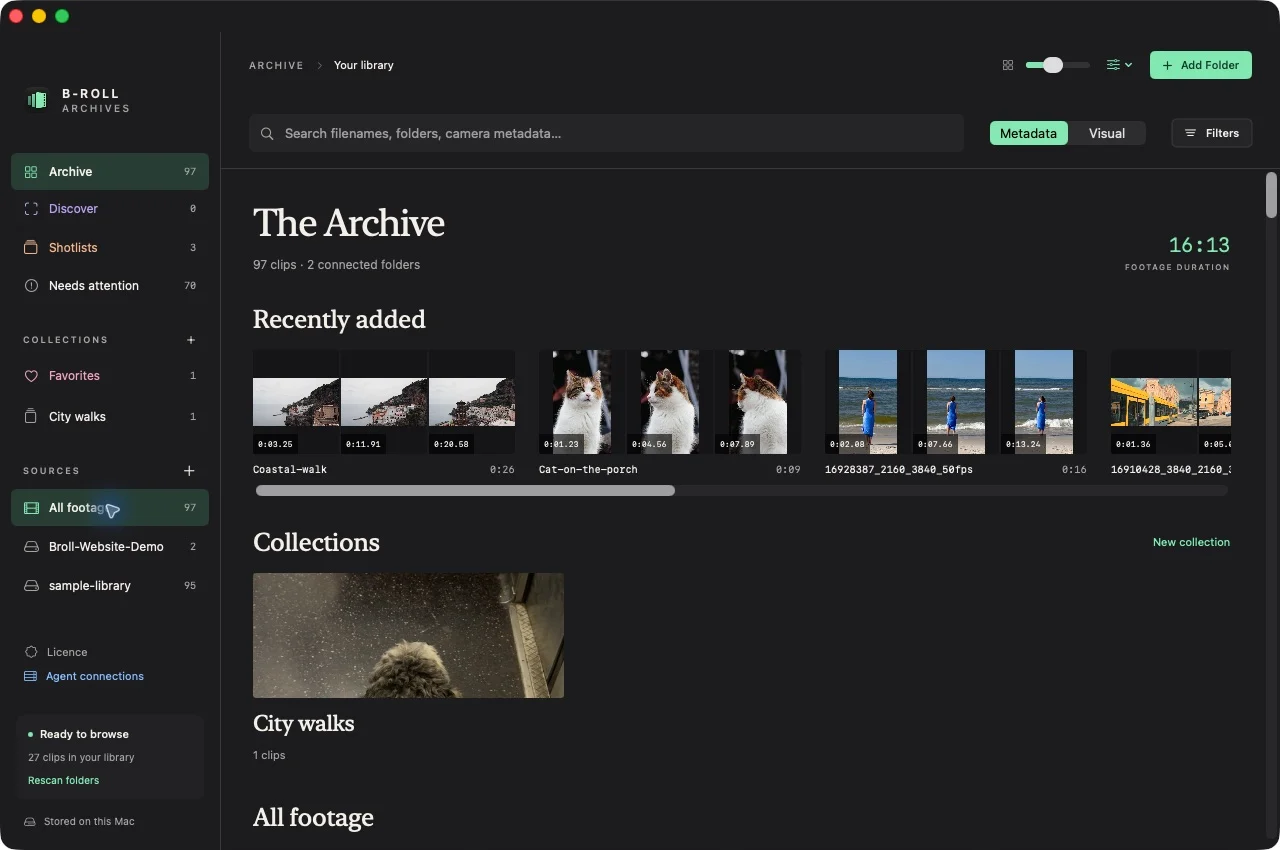
The Archive is the core browsing surface. Use the source sidebar to focus a folder, the search toolbar to find footage, and clip covers to open a contact sheet. A filtered view can show fewer clips than the whole-library sidebar count.
Prototype captures may also show Discover, Shotlists, Collections, or Favorites. This website focuses on the Archive retrieval workflow. Discover and Shotlists are still in development.
Rescan after changes
Rescan a connected source after adding or changing files. Preparation is incremental and uses available source-revision information. Continuous live folder watching is not included.
Expected result and limits
Ready clips have cached previews you can browse. A failed file does not establish that the entire source failed; inspect its status and try another readable clip. Requires Apple Silicon (M1 or later); Intel Macs are not supported. Large-library performance and earlier macOS runtime compatibility still need broader verification.
Preparing overview frames and preparing visual search are separate steps. Metadata search works without the visual model.