
The best way to organize video files is to keep a reliable home for the originals and build a way to recognize what is inside them. On a Mac, a useful system combines folders that preserve source context, a visual catalog, and enough metadata to narrow a search. A perfectly tidy folder tree still cannot tell you which clip contains the moment you remember.
Start with retrieval: when you want a shot six months from now, what will you remember about it? Often it is the place, subject, season, or movement. Sometimes it is a project name. Your system should accommodate both.
Inventory the folders and drives you already have
Write down where your footage lives before changing anything. Include current projects, older project drives, camera-card copies, and loose folders on your Mac. Give drives names you can recognize. Note which footage is only present on one drive so you can address backup separately.
Choose a stable location for each source. Avoid starting a catalog while you are still copying a folder or moving its contents. If two drives contain the same files, decide which copy you normally edit from; a catalog is not a duplicate-management or backup system.
You do not need to rename thousands of clips before they become useful. First make the existing collection visible.
Preserve useful source context
Keep project, location, date, and camera context when it is already present. A folder called 2026-09-Coast/Camera-A/ tells you something that a renamed file in a single enormous folder would lose.
For new shoots, use a folder naming convention you can maintain. A date followed by a short project or place name is a reasonable starting point. Keep original camera filenames when they are useful for matching media back to a project or another backup.
Treat renaming and moving as deliberate file-management work. B-Roll Archives reads your existing folders; it does not perform those operations for you.
Organize video files around visual recognition
A cover frame gets you closer to the clip. A contact sheet gets you closer to the moment inside it. These are especially useful when many files share a name pattern or were filmed in the same location.
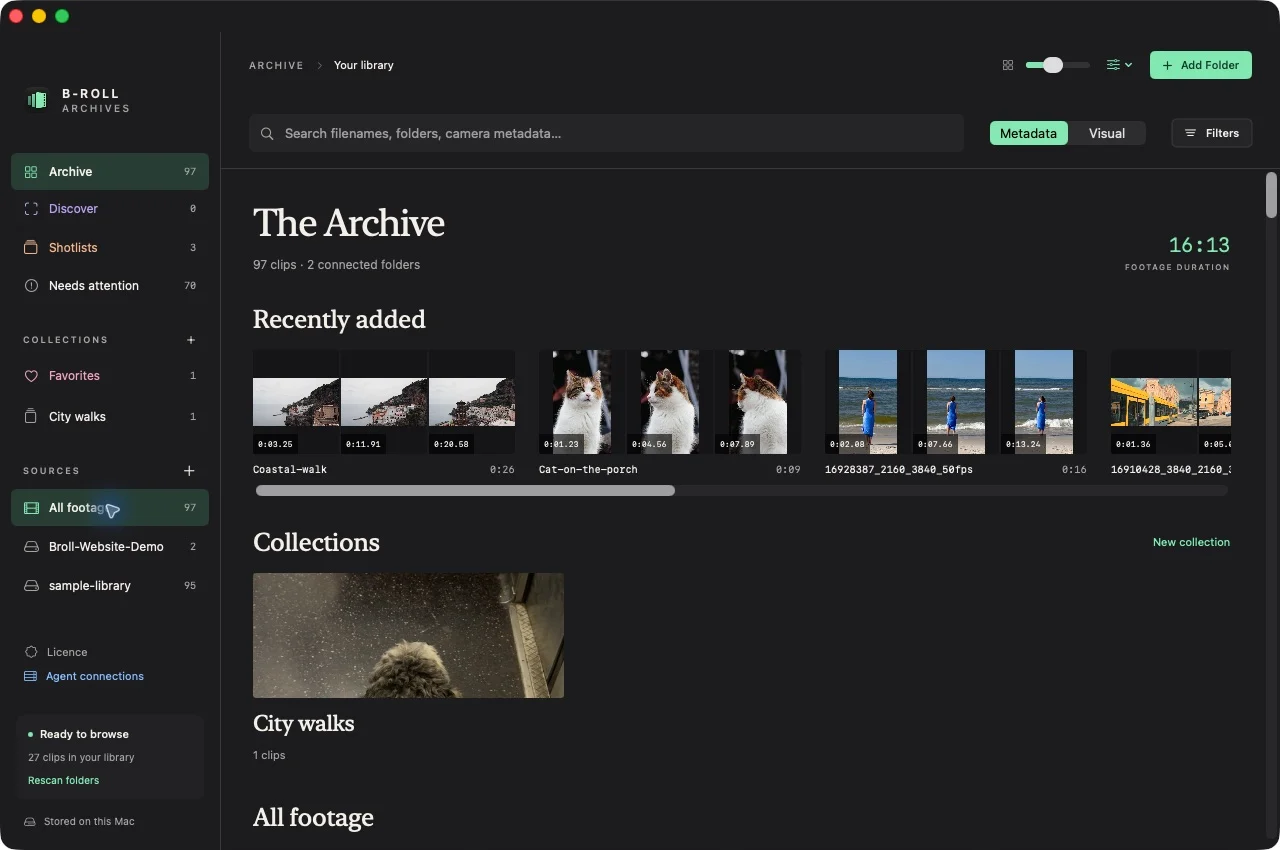
In the Archive capture above, prepared clips appear with a visual cover and filename. This is a catalog of existing video files, not a replacement location for them. You can connect a folder or drive, prepare previews, and browse the library without changing the source structure.
Preparation takes time because the app has to discover and read the media. Pause and resume when necessary. A later rescan detects new or changed files. Keep your independent backups; a preview cache cannot replace the original video.
Narrow the library with details you know
Use a filename or path fragment when you remember the project. Use metadata when you remember a property of the footage: a portrait clip, a short duration, a particular codec, or a date range.
Combine a few meaningful constraints instead of adding every possible filter. “Portrait clips under ten seconds” is easier to assess than a search that accidentally excludes the shot with an uncertain capture date.
Available metadata varies between files. A missing camera or capture-date field does not mean the video is unreadable. B-Roll Archives uses file modification time when capture time is unavailable, so interpret date results in that context.
Use contact sheets when filenames fail
Open a promising clip and scan its sampled frames. You may recognize a change in angle or subject that the cover image missed. Select the frame nearest the moment you want and playback begins at that timestamp.
The initial overview contains twelve samples per clip. A brief event can occur between them. Use playback or the prototype’s closer range inspection when a sample does not settle the question. Read how video contact sheets help you browse for the distinction between a sampled overview and complete video coverage.
Retrieve the original when it is time to edit
The final step is getting back to source media. Confirm the clip and moment, reconnect its drive if needed, and use the original in your editing workflow. The catalog helps you find footage; it does not become your editing timeline.
Cached previews remain useful when a prepared drive is disconnected, but original-file playback still needs the source. The disconnected-drive guide explains that boundary.
Once this is working, expand it to the footage that outlives an individual project. Organizing B-roll for reuse follows the same retrieval-first approach across older shoots.