
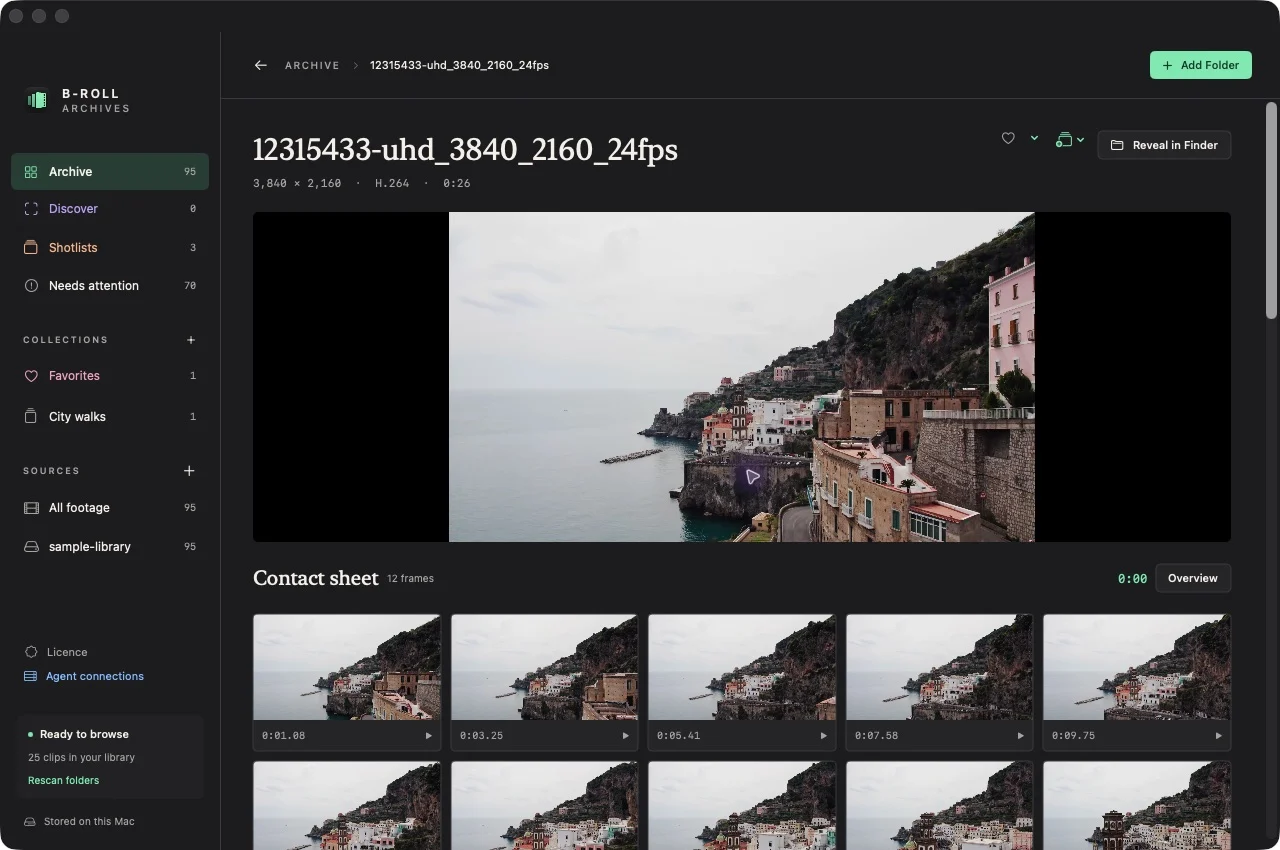
A video contact sheet is a set of still frames sampled from different times in a clip. On a Mac, you can use one to recognize the contents without watching the entire video. Some tools export a static image for sharing or printing. B-Roll Archives currently uses contact sheets for interactive browsing and timestamp retrieval; it does not export a contact-sheet image or PDF.
Those are different tasks. Choose the workflow according to what you need to do with the frames.
What a video contact sheet tells you
A single cover image represents one moment. A contact sheet shows several moments, usually in time order, and often labels them with timestamps. It gives you a quick view of the shot’s subject, movement, and changing composition.
In the example above, the frames come from one coastal clip. They reveal how the camera moves through the scene while preserving the identity of the source file. This is useful when the filename gives you little visual information or when several clips look similar at the beginning.
Treat the sheet as a sampled overview. Twelve evenly distributed frames cannot establish everything that happens in a long clip, and a quick gesture or passing subject might fall between them.
Interactive browsing helps you retrieve a moment
An interactive contact sheet connects the image back to the video. You see a promising frame, select it, and begin playback at the recorded timestamp instead of starting from the beginning.
In B-Roll Archives, preparation creates twelve locally cached overview frames per readable clip. Open a clip from the Archive to see them. Selecting a sample opens original-file playback at that time. You can then watch the nearby footage to judge the timing and quality of the shot.
The prototype also offers a closer look at a selected time range with a denser set of 24 frames. Those range frames are for inspection and are not currently added to the visual-search index. Follow the contact-sheet instructions and playback guide for the current controls.
Static export helps you share a reference
An exported contact sheet is normally an image or document containing the sampled frames. It can be useful for an email, a printed reference, or a conversation about a clip when the other person does not have the same library application.
The exported image needs enough context to be useful: a source filename, a clear order, and timestamps when someone will need to return to the video. Consider readability at the size it will actually be viewed or printed. Making more tiny frames is not always better than choosing fewer useful samples.
B-Roll Archives does not currently provide contact-sheet image/PDF export or printing. If your task requires that deliverable, use a workflow that explicitly supports export. Do not assume a browsable contact sheet includes a downloadable output.
Cached frames and original footage have different jobs
Prepared contact sheets live on the Mac separately from the source videos. This means you can continue recognizing footage after a drive is disconnected. The library can show a moment you filmed even while the original file is unavailable.
Playback still requires that source. Reconnect the drive before opening the original, and use your independent backup if the source has been lost. Cached JPEG previews are not a recoverable copy of the video.
The disconnected-drive documentation explains what remains available and how to reconnect a source.
Make contact sheets part of retrieval
You do not have to browse every frame in every clip. Start by narrowing the library with source context, filenames, or metadata. Use contact sheets to recognize a promising clip, then watch the nearby original footage before choosing it for an edit.
This fits a broader system for organizing video files and makes B-roll you already filmed easier to reuse. The contact sheet supplies the visual memory; the original remains the footage you work with.